
npm cache clear is a command searched by developers in Egypt who are facing broken installs, dependency conflicts, or unexpected build errors in Node.js projects. The intent is not academic. People want a fast, reliable fix that works without damaging their setup or wasting hours debugging.
This guide explains npm cache clear from a real-world development perspective. It focuses on when to use it, when not to use it, what problems it actually solves, and how Egyptian developers can apply it safely in daily work.
What Is npm cache and Why It Exists
NPM uses a local cache to store downloaded packages. This cache helps speed up future installs and reduces repeated downloads.
However, over time, the cache can contain:
- Partial downloads
- Outdated metadata
- Corrupted files
- Conflicting package versions
When that happens, normal installs can break. This is where npm cache clear becomes relevant.
What npm cache clear Actually Does
Running npm cache clear removes cached package data stored locally by NPM. It does not delete your project files. It only resets the cache used during package installation.
Modern versions of NPM require a force flag because clearing the cache is not always necessary.
How to Run npm cache clear Safely
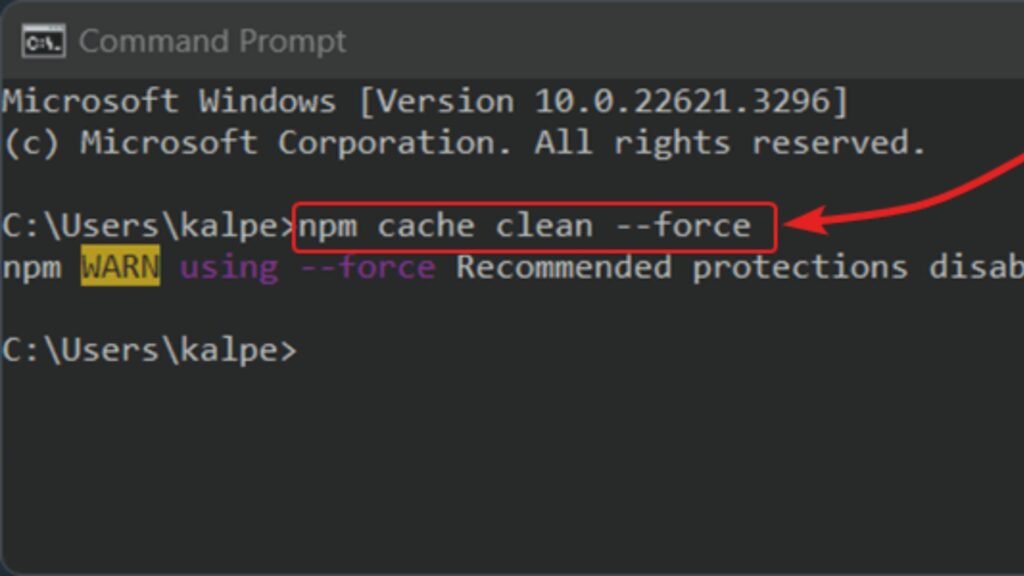
To clear the cache correctly, use the command below:
npm cache clean –force
This command performs the function commonly referred to as npm cache, even though the wording has changed in newer NPM versions.
You can verify cache status afterward with:
npm cache verify
This ensures your environment is clean and consistent.
When You Should Use npm cache clear
Using npm cache clear makes sense in specific situations, including:
- Repeated install failures
- Packages installing but not working
- Dependency resolution behaving inconsistently
- Errors after switching Node versions
It should not be used as a daily habit.
When You Should NOT Use npm cache clear
Clearing the cache is not a universal fix. Avoid using npm cache clear when:
- A single package has a documented bug
- Your Node version is incompatible
- The issue is caused by incorrect import paths
- Environment variables are misconfigured
Clearing the cache will not fix logic errors or miswritten code.
npm cache clear vs npm clear cache (Common Confusion)
Many users search for npm clear cache, assuming it is a separate command. In practice, both terms refer to the same intent.
The correct modern usage still maps back to cache clear behavior using the force flag.
Understanding this avoids unnecessary command misuse.
Typical Problems Fixed by npm cache clear
Here are real issues developers in Egypt often resolve using cache clear:
- “Unexpected end of JSON input” errors
- Package tarball corruption
- Failed post-install scripts
- Broken lock files after interrupted installs
It is especially helpful on shared machines or unstable connections.

Development Environments Where Cache Clear Helps Most
Local Development Machines
Clearing the cache helps when switching between multiple projects.
- Cost impact:Free tool
- Time cost: ~10–20 minutes (≈ 20–50 EGP in developer time)
CI/CD Pipelines
Cache corruption can cause unpredictable pipeline failures.
Estimated cost savings: Prevents wasted build minutes
Saves ~100–300 EGP per failed pipeline run
Freelance and Agency Work
Different client projects often require different dependency trees.
Estimated value: Faster troubleshooting
Less downtime during delivery
Performance Impact After cache clear
After running npm cache clear, the first install may be slower because packages are downloaded again. After that, performance stabilizes.
This tradeoff is usually worth it when resolving hard-to-trace issues.

Best Practices for Egyptian Developers
To avoid needing npm cache clear too often:
- Use stable Node versions
- Lock dependencies properly
- Avoid mixing package managers
- Clean node modules before major upgrades
Following these steps reduces cache-related problems.
Final Thoughts on npm cache clear
Searching for npm cache clear usually means something is already broken. The command is not magic, but when used correctly, it saves time, frustration, and unnecessary reinstallation.
For developers in Egypt working on real projects with deadlines, understanding when and how to clear the cache is a practical skill, not just a technical detail.
Used responsibly, cache clear is a reliable troubleshooting tool, not a shortcut.